Filing your Income Tax Return (ITR) for FY 2024–25 (AY 2025–26) can be done online or offline, depending on convenience and accessibility. Online filing through the Income Tax e-Filing Portal is the most popular and efficient method, allowing taxpayers to submit their return from anywhere, verify income, claim deductions, and receive refunds quickly.
The process involves logging in with your PAN, selecting the appropriate ITR form, filling in income, deduction, and tax details, and completing e-verification via Aadhaar OTP, net banking, or digital signature.
Offline filing is suitable for individuals or businesses preferring physical submission, where taxpayers can use the ITR utility (Excel/Java) or manually fill the paper form and submit it to the Centralized Processing Centre (CPC) or local Income Tax office. Regardless of the method, ensuring accurate data entry, selecting the correct ITR form, and completing verification are crucial to avoid errors and comply with statutory requirements.
Step-by-Step Guide to Filing ITR Online for AY 2025–26 via the Income Tax Portal
This guide provides a comprehensive, easy-to-follow process for individuals and professionals to file their Income Tax Return (ITR) online for Assessment Year 2025–26 through the official Income Tax e-Filing Portal, ensuring compliance and accurate reporting of income, deductions, and tax payments.
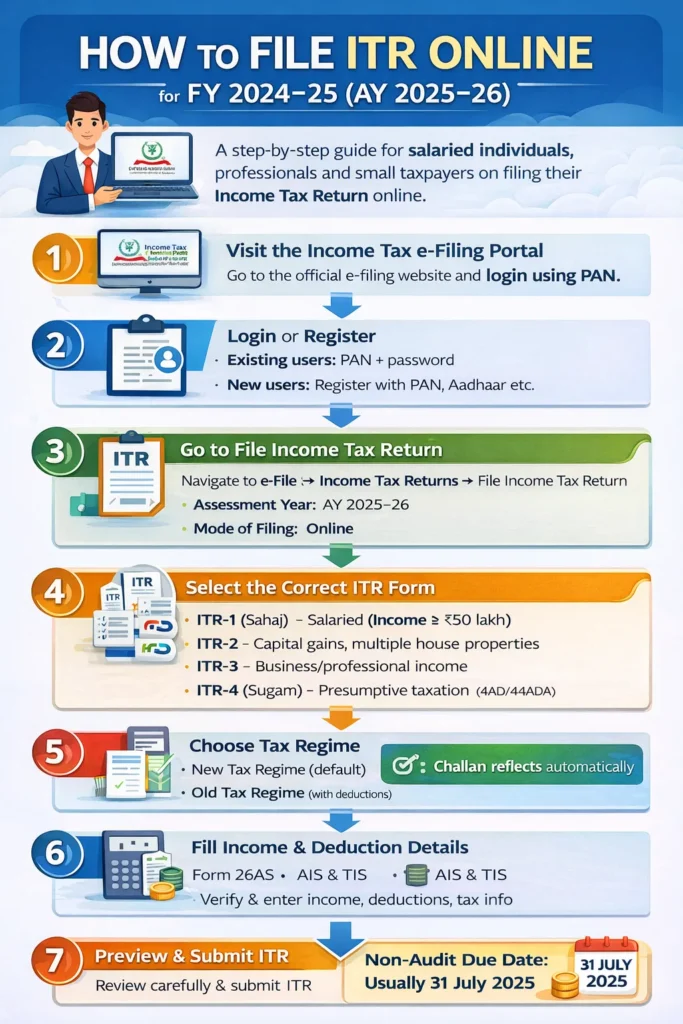
Step 1: Visit the Income Tax e-Filing Portal
Go to the official e-filing website and log in using your PAN (PAN acts as your user ID).
Step 2: Login or Register
- Existing users: Login with PAN and password
- New users: Complete registration using PAN, Aadhaar, and basic details
Step 3: Go to File Income Tax Return
Navigate to:
e-File → Income Tax Returns → File Income Tax Return
Select:
- Assessment Year: AY 2025–26
- Mode of Filing: Online
Step 4: Select the Correct ITR Form
Choose the applicable ITR form:
- ITR-1 (Sahaj) – Salaried individuals (income up to ₹50 lakh)
- ITR-2 – Capital gains, multiple house properties
- ITR-3 – Business or professional income
- ITR-4 (Sugam) – Presumptive taxation (44AD/44ADA)
Step 5: Choose Tax Regime
Select either:
- New Tax Regime (default)
- Old Tax Regime (with deductions & exemptions)
## Make sure your choice matches your tax planning.
Step 6: Fill in Income & Deduction Details
The portal will auto-fill many details from:
- Form 26AS
- AIS & TIS
- PAN database
Verify and enter:
- Salary / Business income
- Interest income
- Capital gains
- Deductions (80C, 80D, etc., if old regime)
Step 7: Calculate Tax & Pay (If Applicable)
- Review tax computation
- Pay self-assessment tax, if any
- Challan details will auto-reflect
Step 8: Preview & Submit ITR
- Carefully review the return
- Submit the ITR online
Step 9: Verify Your ITR (Mandatory)
ITR verification must be done within 30 days using:
- Aadhaar OTP (most common)
- Net banking
- Digital Signature (DSC)
- Physical ITR-V (last option)
## Failing to e-verify ITR, which means the return will be considered as having never been filed.
How to File ITR Offline for AY 2025–26
Offline filing is mainly used by taxpayers who cannot file online or prefer submitting a physical return through paper mode or utility software. There are two primary methods: ITR Utility (Excel / Java) and Paper Filing.
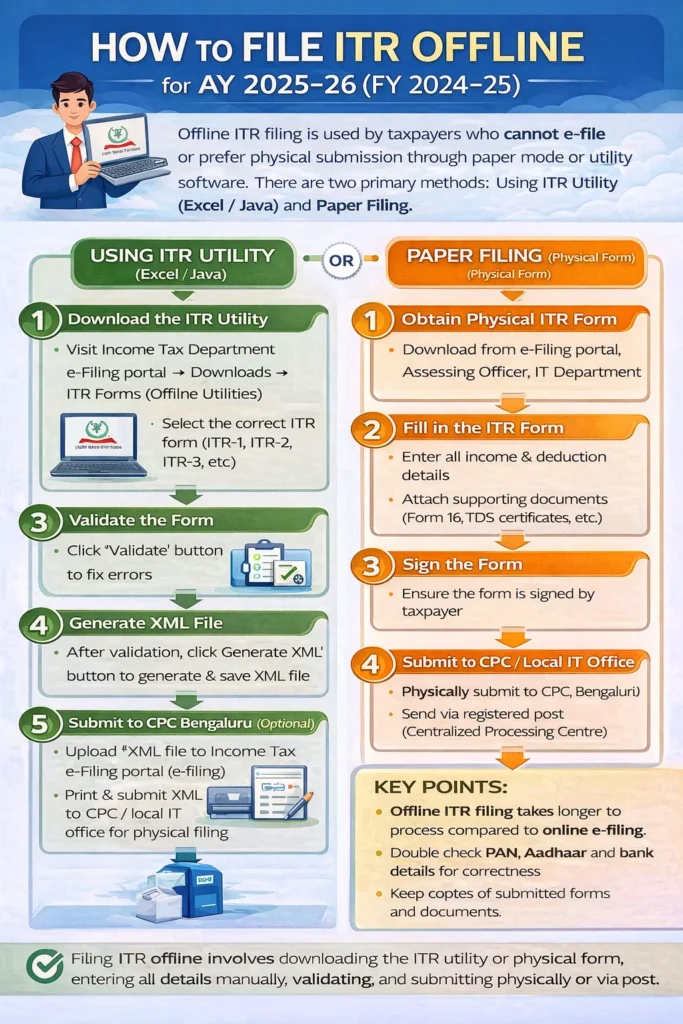
Using ITR Utility (Excel / Java)
- Download the ITR Utility
- Visit the Income Tax Department e-Filing portal → Downloads → ITR Forms (Offline Utilities)
- Select the correct ITR form (ITR-1, ITR-2, ITR-3, etc.)
- Fill the ITR Form
- Open the utility in Excel or Java version
- Enter personal details, income, deductions, and tax paid
- Ensure all mandatory fields are filled correctly
- Validate the Form
- Click on the “Validate” button
- Fix any errors highlighted by the utility
- Generate XML File
- After validation, click “Generate XML.”
- Save the XML file on your computer
- Submit to CPC Bengaluru (Optional)
- Upload the XML on the Income Tax e-Filing portal (for offline submission via XML)
- Or print and submit physically to the Income Tax Department (if paper submission is allowed)
Paper Filing (Physical Form)
- Obtain Physical ITR Form
- Download from the Income Tax e-Filing portal or get a physical copy from the Assessing Officer/IT Department
- Fill in the ITR Form
- Enter all personal, income, deduction, and tax details
- Attach all required supporting documents (Form 16, TDS certificates, etc.)
- Sign the Form
- Ensure the form is signed by the taxpayer
- Submit to CPC / Local IT Office
- Submit the completed form personally or via registered post to the CPC, Bengaluru (for central processing)
- Keep a copy for records
## Filing ITR offline involves downloading the appropriate ITR utility or physical form, entering income and deduction details, validating, signing, and submitting either electronically via XML or physically to the Income Tax Department.
Important Due Date
- Non-audit cases: Usually 31 July 2025
- Audit cases: Later date as notified
Common Mistakes to Avoid
- Selecting the wrong ITR form
- Not verifying the return
- Mismatch with AIS / Form 26AS
- Ignoring interest income
- Wrong tax regime selection
Documents Required for Filing ITR
Keep all receipts, statements, and certificates handy before filing your ITR to avoid errors and ensure smooth e-verification.
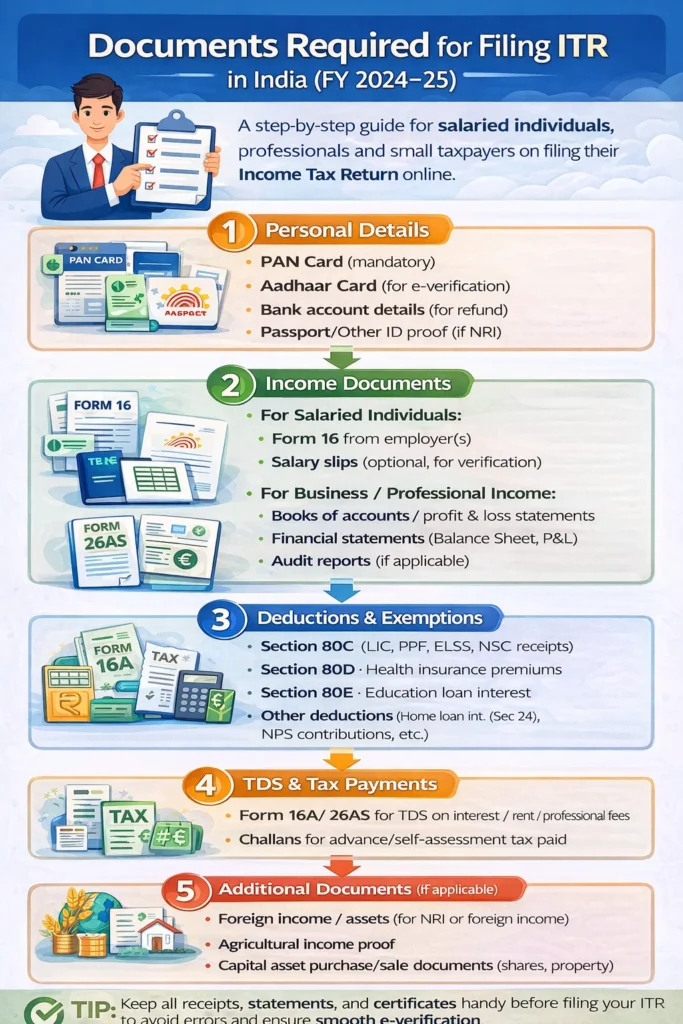
Personal Details
- PAN Card (mandatory)
- Aadhaar Card (for e-verification)
- Bank account details (for refund)
- Passport/Other ID proof (if NRI)
Income Documents
For Salaried Individuals:
- Form 16 from employer(s)
- Salary slips (optional, for verification)
For Business/Professional Income:
- Books of accounts/profit & loss statements
- Financial statements (Balance Sheet, P&L)
- Audit reports (if applicable)
For Other Income:
- Form 26AS (tax credit statement)
- Interest certificates from banks / post office
- Dividend statements
- Capital gains statements (if shares/mutual funds sold)
- Rental income proof (rent agreement / Form 16B)
Deductions & Exemptions
- Section 80C: LIC, PPF, ELSS, NSC receipts
- Section 80D: Health insurance premiums
- Section 80E: Education loan interest
- Section 80G: Donations receipts
- Other deductions: Home loan interest (Sec 24), NPS contributions, etc.
TDS & Tax Payments
- Form 16A / 26AS for TDS on interest / rent / professional fees
- Challans for advance/self-assessment tax paid
Additional Documents (if applicable)
- Foreign income/assets (for NRI or foreign income)
- Agricultural income proof
- Capital asset purchase/sale documents (shares, property)
Frequently Asked Questions
1. What are the benefits of filing ITR online?
- Faster processing and refunds
- Automatic calculation of taxes and TDS verification
- Convenient submission from home
- Easy to track status of return and refunds
2. Which ITR form should I use?
- ITR-1 (Sahaj) – Salaried individuals (income up to ₹50 lakh, no business income)
- ITR-2 – Individuals with capital gains, multiple house properties, or foreign income
- ITR-3 – Business or professional income
- ITR-4 (Sugam) – Presumptive income under Sections 44AD / 44ADA
3. How do I log in to the Income Tax e-Filing portal?
- Visit the Income Tax e-Filing portal
- Login with PAN (username) and password
- New users can register using PAN, Aadhaar, and basic details
4. What details are needed to file ITR online?
- Personal details (PAN, Aadhaar, bank account)
- Income details (Form 16, salary slips, capital gains, interest income)
- Deductions (Section 80C, 80D, 80G, etc.)
- Tax paid (advance tax or self-assessment tax)
5. How is the tax calculated in online filing?
- The portal auto-fills Form 26AS and TDS details
- Tax is calculated automatically based on declared income, exemptions, and deductions
- Pay any self-assessment tax before submission
6. How do I submit and verify the ITR online?
- Review the filled ITR form and submit it online
- Verification methods:
- Aadhaar OTP (most common)
- Net banking
- Digital Signature Certificate (DSC)
- Physical ITR-V sent by post
7. Can I revise my ITR after filing online?
- Yes, ITR can be revised online if an error is found
- Revision must be done before the end of the relevant assessment year or any extended due date
8. I have filed my return. When will I get a refund?
Usually, it takes 30-40 days to get your refund after filing your Income Tax Return.
9. How to check if ITR is filed?
Step 1: Log in to the e-filing portal with your user ID and password.
Step 2: Go to e-File > Income Tax Returns > View Filed Returns.
Step 3: View all your filed returns on the page.
10. What are the consequences of not e-verifying an income tax return?
Failing to e-verify ITR will result in invalidation of the return, which means the return will be considered as having never been filed.
11. What to do if I made a mistake while filing my income tax return?
You can revise your already filed ITR before 31st December of the next financial year, i.e., for FY 2024-25, the filing date of it would be till 31st Dec 2025.
Complete Steps to download the file.
1) Go to the Image you see and a random Website will open.
2) Copy the URL and paste it below.
3) Click "Send" to receive the Download Link.

Leave a Reply